
n8n Lead Qualification Automation: From Form Fill to Sales-Ready in Minutes
Manual lead qualification is one of the biggest silent killers of sales productivity.
A new Typeform submission arrives, someone skims the answers, opens multiple tabs to
research the company, makes a gut call on quality, and decides whether to reply today,
next week, or never.
Multiply that by dozens of form fills per week and you get hidden manual work,
slow follow-ups, and missed opportunities.
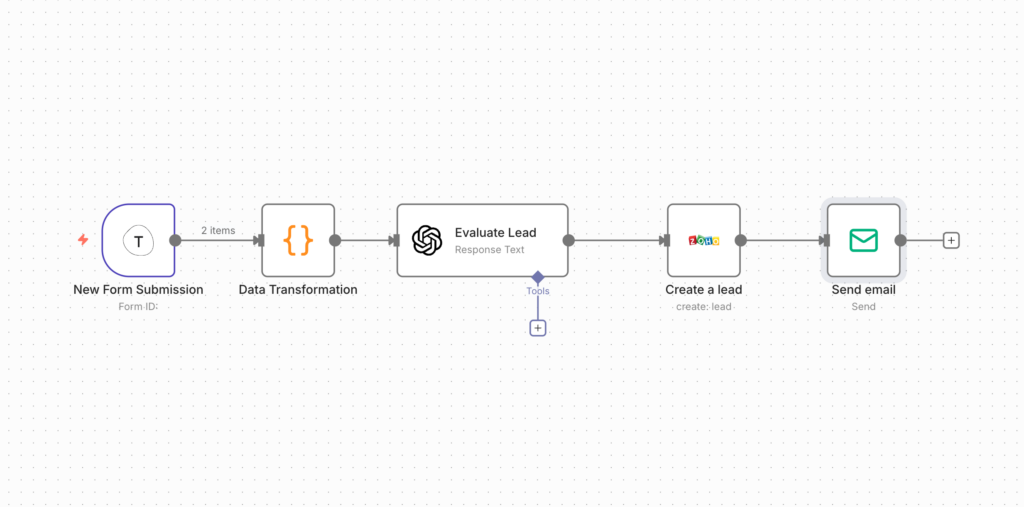
In this article, we walk through a real-world n8n lead qualification automation
built around Typeform: from capturing a lead to enriching, scoring, routing, and even
drafting a personalized first email—automatically.
What You’ll Learn
- Why automating lead qualification matters now
- How the Typeform → n8n → CRM flow works
- Designing a simple but powerful scoring model
- Implementing the workflow in n8n step by step
- Using AI to enrich leads and generate emails
- What changes in your sales performance after automation
1. Why Automate Lead Qualification at All?
Digital funnels have made lead management more complex:
- Multiple sources: ads, SEO, social, affiliates, referrals
- Forms with open-ended questions and custom logic
- Prospects researching deeply before talking to sales
- Teams juggling Typeform, CRM, email, and spreadsheets
Without automation, the best leads don’t always get the fastest response, and
qualification criteria change from rep to rep.
By building a robust n8n lead qualification automation around Typeform, you can:
- React to high-intent leads within minutes
- Enrich data automatically (industry, size, context)
- Score and prioritize consistently based on your ICP
- Route leads to the right owner and pipeline stage
- Send a tailored intro email before anyone touches the CRM
2. The Flow: From Typeform to Sales-Ready Lead
Here’s the end-to-end flow you implemented with n8n and Typeform:
2.1 High-Level Architecture
- Step 1 – Capture: Prospect fills your Typeform lead form.
- Step 2 – Trigger: Typeform sends the submission to n8n via webhook.
- Step 3 – Normalize: n8n flattens and renames fields.
- Step 4 – Enrich: n8n calls APIs/AI to add company and intent data.
- Step 5 – Score: n8n applies your lead scoring rules.
- Step 6 – Route: n8n sends the lead into your CRM or pipeline tool.
- Step 7 – Email: n8n drafts a personalized reply, ready to send.
- Step 8 – Notify: Sales gets a Slack/email alert for hot leads.
Typeform gives you structured answers; n8n turns those answers into decisions and actions.
3. Designing Your Lead Qualification and Scoring
Before touching nodes in n8n, define what “qualified” means for you. Otherwise, you
automate noise.
3.1 Define Your Ideal Customer Profile (ICP)
Clarify:
- Target industries and “no-go” sectors
- Ideal company size ranges (e.g. 10–50, 50–250 employees)
- Roles and titles you sell to (founders, directors, managers)
- Minimum viable budget for a project or subscription
- Regions or countries you actually serve
Turn these into simple rules and weights. This becomes your scoring model in n8n.
3.2 Example Lead Scoring Model
For example:
- Industry: +20 if SaaS, +15 if agency, +0 otherwise
- Company size: +20 if 10–50 employees, +10 if 1–9
- Role/title: +20 if founder/C-level, +10 if head/manager
- Budget: +20 if above your minimum deal size
- Urgency (from Typeform): +20 if “ASAP”, +10 if “within 3 months”
Then define tiers:
- 80–100 → Hot lead
- 50–79 → Warm lead
- 0–49 → Nurture
4. Implementing the Workflow in n8n
Now let’s walk through how to build this in n8n, using Typeform as the trigger.
4.1 Trigger: Typeform → Webhook
- Create a new workflow in n8n and add a Webhook node.
- Copy the webhook URL.
- In Typeform, go to Connect → Webhooks and add the n8n URL.
- Submit a test entry to see the payload arrive in n8n.
This gives n8n full access to all answers and metadata for every form submission.
4.2 Normalize Typeform Data
Typeform responses are structured but nested. In n8n, use:
- Set node to map answers to fields like
email,company,website,role,budget,use_case. - Function node if you need to loop over answers or map question IDs to labels.
Aim for a flat JSON object that’s easy to enrich and score.
4.3 Enrich the Lead
To go beyond raw form data, you can:
- Call enrichment APIs (e.g. Clearbit, Snov.io) via HTTP Request.
- Use AI via HTTP Request to:
- Summarize the use case from free-text answers.
- Classify intent (researching vs ready-to-buy).
- Extract key pains and desired outcomes.
Then use a Merge node to combine original Typeform data with enriched fields.
4.4 Apply Lead Scoring Logic
Add a Function node in n8n to calculate a numeric score and tier:
// Example n8n Function node
const item = items[0];
let score = 0;

if (['SaaS', 'Agency'].includes(item.json.industry)) score += 20;
if (item.json.companySize === '10-50') score += 20;
if (/founder|ceo|cmo|cto/i.test(item.json.role)) score += 20;
if (item.json.budget >= 3000) score += 20;
if (item.json.urgency === 'ASAP') score += 20;

let tier = 'Nurture';
if (score >= 80) tier = 'Hot';
else if (score >= 50) tier = 'Warm';

item.json.score = score;
item.json.tier = tier;

return items;
Follow this with IF nodes to branch the flow for Hot, Warm, and Nurture leads.
5. Routing to CRM and Drafting Personalized Emails
Once the lead is scored, push it where your team actually works—your CRM—and
kick off communication.
5.1 Create or Update CRM Records
Using n8n’s CRM nodes (e.g. HubSpot, Pipedrive, Close, Salesforce) or APIs:
- Search for an existing contact by email.
- If found, update contact/company with enriched data and score.
- If not, create a new contact and organization.
- Create a deal/opportunity with stage based on the tier.
Every qualified lead ends up in the right place, already enriched and categorized.
5.2 AI-Generated Intro Email
Use an HTTP Request node to call an LLM (e.g. OpenAI) and pass:
- Name, company, role
- Key Typeform answers (goals, challenges, timeline)
- Enriched data (industry, size)
- Your offer and tone guidelines
The AI returns a tailored first-touch email that:
- References their specific problem
- Shows you understand their context
- Offers a clear next step (call, demo, strategy session)
You can auto-send it for Warm leads or save it as a draft for reps to review for Hot leads.
6. Keeping Your Team in the Loop
6.1 Slack or Email Alerts
For Hot leads, add a Slack or email node to send a concise summary to the relevant
sales channel or owner:
- Name, company, role
- Score and tier
- Key pain summary (from AI)
- Link to CRM record
- Draft email text
Reps can jump in fast, with full context and minimal manual prep.
6.2 Tracking and Improving Over Time
To understand the impact of your n8n lead qualification automation, you can:
- Log scores, tiers, and sources to a sheet or database.
- Measure time from Typeform submission to first response.
- Compare close rates by tier (Hot vs Warm vs Nurture).
This feedback loop lets you refine your scoring model and ICP continuously.
7. Real-World Impact
Once this system is live, you typically see:
- 4–6 hours/week saved per salesperson on admin work.
- High-intent leads getting a response in minutes, not days.
- Sales focusing on the best-fit deals rather than unqualified noise.
- Cleaner, more complete CRM data for forecasting and reporting.
And because it runs on n8n, you keep control: you can add branches, tools, and rules
without rewriting everything.
8. From Single Workflow to Automation Ecosystem with Khetta
This Typeform + n8n setup is a powerful starting point. The next step is connecting
it into a broader automation ecosystem across your funnel.
At Khetta, we help teams:
- Design API-first workflows connecting forms, n8n, CRMs, and analytics.
- Use RPA and process automation to remove repetitive sales ops work.
- Build conversion-optimized websites and forms that feed better leads.
- Deploy SEO and content engines that drive consistent qualified traffic.
The goal isn’t just more automation. It’s a cohesive sales system where your website,
your n8n lead qualification automation, your CRM, and your reporting
all work together.
Schedule Your Free Expert Consultation and let’s turn your Typeform into a 24/7 lead qualification engine that lets your team focus on closing, not copy-pasting.
